
AutoZen-Car Dashboard&Launcher
ZenThekAuto & Vehicles
4.1252.00 Reviews
- Version
- 8.0.10
- Installs
- 1.00M
- Age Rating
- Everyone
Screenshots
Our Review of AutoZen-Car Dashboard&Launcher
 Analysis by Appyee
When I use a phone in the car, I want the screen to make the next action obvious, not invite me to browse a row of tiny icons. AutoZen-Car Dashboard&Launcher is built around that practical idea: it gives driving-related controls a more prominent place on the phone. Its usefulness depends less on how many things it can show than on whether the layout suits the way you actually drive.
What to expect when you open it
AutoZen is a free driving app from ZenThek, with optional in-app purchases. It has an average rating of 4.2 from around 5,500 ratings and has been installed over a million times. It is rated for Everyone, and its current version is 7.1.1. Those details give a sense of its reach, but they do not tell you how it will behave on your particular phone; a sensible first step is to configure the dashboard while parked and see how quickly you can find the controls you need.
The speed advantage I value in a car launcher is not a claim that every screen loads faster. It is the reduction in rummaging: navigation, calls, and music are grouped around a driving context instead of being scattered among everyday phone apps. That can make a short trip feel simpler, especially if you set up the home screen before leaving rather than changing its layout at the curb.
Speed is about fewer distractions, not racing through menus
A large, clear dashboard can make it easier to glance at a direction or select a music control, but no phone interface removes the need to pay attention to the road. I treat voice control as a convenience for straightforward requests, not a guarantee that every spoken command will be understood in traffic. Road noise, unfamiliar names, and a complicated request can all make voice interaction less dependable than setting a destination before pulling away.
A useful habit is to prepare the route and playlist while parked, then use the dashboard for quick checks rather than extended searches. That turns the interface into a shortcut instead of another place to make decisions. If you find yourself repeatedly tapping through screens, simplify what appears on the main panel; a smaller set of familiar choices is often quicker than a crowded display.
Busy trips reveal the trade-offs
The app is most appealing when several ordinary driving needs overlap: following directions, keeping music within reach, and handling a call without switching between unrelated phone screens. On a longer drive, that joined-up arrangement can feel more natural than opening a map, returning to the home screen, and hunting for a player. It is also useful when someone else is riding along and can help with a request, though the driver should still keep interaction brief.
There is a trade-off to that all-in-one approach. A dashboard can put more options in view, but more visible controls can also mean more visual clutter. I would avoid treating every available widget as something that belongs on the first screen. Keep the items you use often, and move occasional tools out of the way so the display stays legible at a glance.
Reliability depends on the whole setup
AutoZen sits between you and other driving apps rather than replacing every part of them. Its value therefore depends on the navigation, music, and communication tools you already use, along with the phone’s own connection and audio setup. If a route or media app is having trouble, a dashboard cannot make that underlying service dependable. I would test the combination you plan to use before relying on it for an unfamiliar journey.
For recovery from a hiccup, keep the route available in the navigation app you normally trust and avoid troubleshooting while moving. If voice commands are not working clearly, use a safe place to stop before changing settings or choosing another destination. This is not a special trick so much as a sensible boundary: a car-oriented screen can simplify access, but it should not encourage you to solve phone problems in traffic.
Phone fit and daily practicality
The app requires Android 7.0 or later. That makes the Android version an easy first compatibility check, but a supported operating system alone does not tell you how comfortable the dashboard will be on your particular screen. Before a long trip, check that text is readable from the mounted phone, the controls you rely on are easy to reach, and the display is not distracting in daylight or after dark.
Resource use is another reason to try it during a normal drive rather than judge it from a quick setup. Navigation, audio, calls, and a bright screen can all contribute to the demands of a phone session, so the overall experience depends on the device and how many tasks are running. If your phone already struggles with navigation or becomes uncomfortable to use when charging, adding a dashboard layer may not solve that constraint.
Who will get the most from it
I can see AutoZen suiting drivers who want a more car-focused home screen and regularly switch between directions, audio, and calls. It is less compelling for someone who already has a simple, reliable in-car interface and only needs a map, or for a driver who prefers to keep the phone out of reach and use the car’s built-in controls. If you rarely use the phone while driving, a dedicated dashboard may add setup without much day-to-day benefit.
Compared with opening a standalone navigation app, AutoZen’s appeal is the broader driving dashboard; the standalone option may be better when all you need is a route and you want the fewest layers between you and it. Compared with a vehicle’s built-in system, a phone dashboard can be more convenient to carry between cars, while the built-in system may be the more natural choice if it already handles your usual tasks comfortably.
Your Driving Companion
So, what’s the deal with AutoZen-Car Dashboard&Launcher? Well, it turns your smartphone into a full-fledged car assistant, making your driving experience safer and more enjoyable. The app is designed to minimize distractions by providing easy access to essential functions through a simple, user-friendly interface.
Easy Navigation
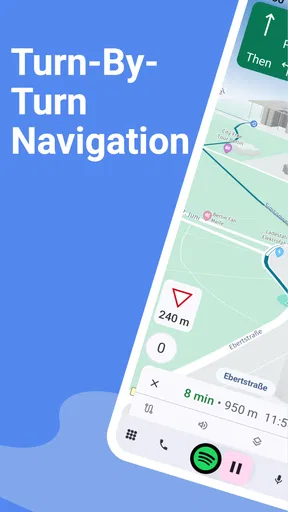
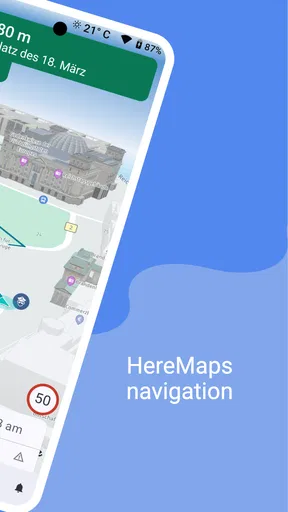
First things first, let’s talk about navigation. AutoZen integrates smoothly with Google Maps, Waze, and other navigation apps, so you’re never left wondering if you’re going the right way. The interface is large and clear, displaying directions, speed limits, and estimated arrival times without making you squint or take your eyes off the road for too long.
With its voice command feature, you can ask for directions, find nearby gas stations, or even search for restaurants without lifting a finger. I’ve tried this while driving through a new city, and it’s been a lifesaver. Just say, "Hey, AutoZen," followed by your request, and you’re set.
Entertainment on the Go
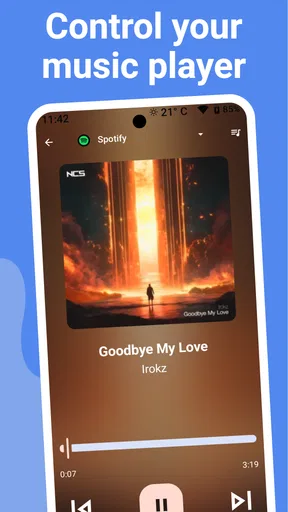
AutoZen isn’t just about getting you from point A to point B—it’s also about enjoying the journey. The app lets you control your favorite music and podcasts with ease. Whether you’re a Spotify loyalist or an Apple Music fan, AutoZen’s got you covered. The music player is intuitive, with large buttons for easy access, so you can skip those annoying tracks or crank up the volume without hassle.
Stay Connected
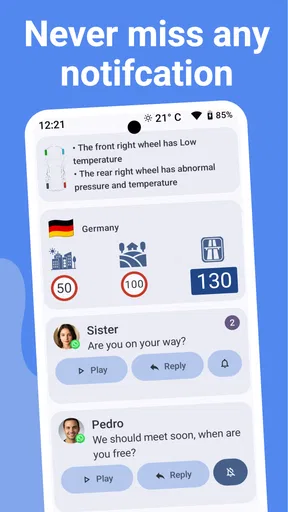
Now, let’s dive into connectivity. AutoZen ensures you stay connected safely. It allows hands-free calls and messages, which is perfect for those of us who can’t completely unplug. The app reads your messages aloud and lets you respond using voice commands, so you’re not tempted to fumble with your phone at a red light.
What’s more, AutoZen supports a variety of messaging apps beyond the standard SMS, including WhatsApp and Telegram. It’s like having a personal assistant that ensures you’re always in the loop.
Customizable Interface
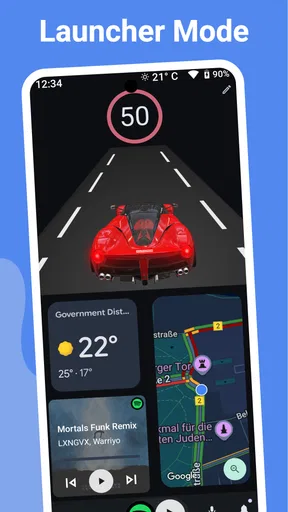
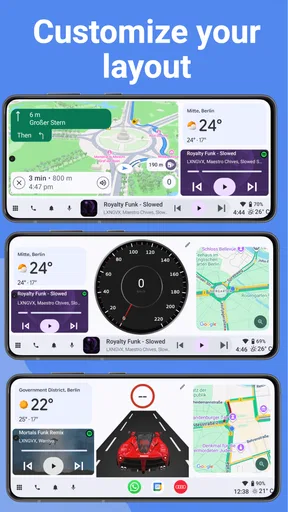
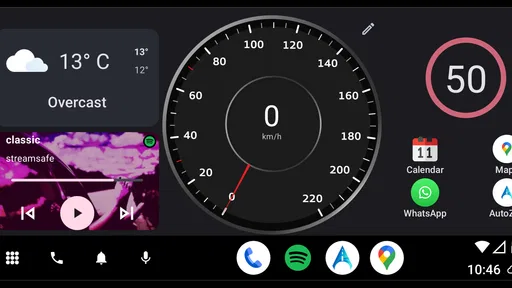
One of my favorite features is the customization options. You can tailor the dashboard layout to suit your needs, choosing which apps and widgets to display prominently. Need quick access to your calendar or a fuel tracker? Just add them to your main screen. It’s all about making your drive as smooth as possible.
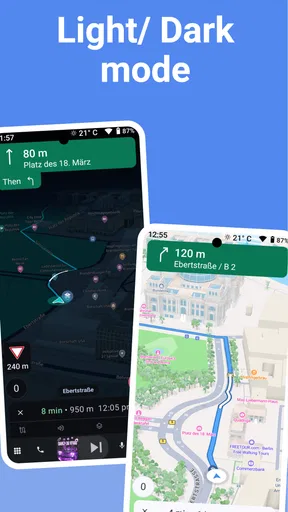
The app also offers a night mode feature, which automatically adjusts the display to reduce glare during nighttime driving. It’s a small touch, but one that makes a big difference when you’re on the road after dark.
Safety First
Safety is obviously a big deal, and AutoZen takes it seriously. With its built-in speedometer and speed limit alerts, you’re constantly reminded to keep your speed in check. Plus, the app warns you about traffic jams and hazards ahead, allowing you to make informed decisions on the fly.
For those who love road trips, the app’s integration with fuel and parking locators is a huge bonus. It helps you plan your stops efficiently, ensuring you’re never caught off guard by an empty tank or full parking lot.
Using it on an ordinary drive
On a familiar commute, I would keep the dashboard focused on the route and the audio controls I actually use. On an unfamiliar city trip, I would set the destination before leaving, then use voice requests only for simple changes such as looking for a nearby stop. This is where the combination feels most practical: it can reduce switching between navigation and media without turning the phone into something I need to operate constantly.
For a passenger, the dashboard can also make it easier to handle a route change or pick a different podcast while the driver concentrates. I would still agree on that division of tasks before setting off. A passenger’s help is useful; a driver trying to dictate a long search or read a message while moving is not a good use of any car app.
Small setup choices that matter
Customization is most useful when it reflects a real routine. If you mostly drive to work, prioritize the navigation and media controls you use on that route instead of filling the screen with tools for rare occasions. If you take longer trips, consider which quick-access items will genuinely help you plan a stop. The practical insight is to build the dashboard around the first action you tend to need, not around every option that happens to be available.
Night mode can make the display more comfortable after dark, but I would check the result while parked before relying on it at night. A dimmer screen may be easier on the eyes, yet the key question is whether the text and controls remain clear in your car’s lighting. Likewise, a speed readout or alert is best treated as a prompt to stay aware, not as a substitute for road signs or careful driving.
What it does not replace
AutoZen is best understood as a driving-oriented way to bring common phone tasks closer together, rather than a reason to abandon the navigation or media apps you already like. If you only need detailed route planning, opening your preferred map app directly may be simpler. If your car already offers a dashboard that works well with your phone, the extra layer may not be worth learning. I would choose the option that makes the fewest interactions necessary in your own vehicle.
There is also a useful distinction between hands-free access and distraction-free driving. Reading messages aloud or speaking a reply can help avoid handling the phone, but conversation still takes attention. I would leave non-urgent messages until a stop and use voice features for short, necessary tasks, particularly in unfamiliar traffic or poor weather.
Final Thoughts
Overall, AutoZen-Car Dashboard&Launcher is a fantastic app for anyone who spends a lot of time behind the wheel. It’s like having a digital co-driver that keeps you entertained, informed, and safe. The app’s blend of functionality and ease of use makes it a must-have for drivers looking for a smarter, more enjoyable driving experience.
If you’re ready to upgrade your drive, you can download AutoZen on both Android and iOS. Give it a try, and let me know how it transforms your time on the road. Safe travels!
My performance verdict
I see the main performance win as organization, not raw speed: the app places driving tasks in a shared space, which may cut down on unnecessary screen changes. I would not assume that this makes an older or heavily loaded phone feel faster. Navigation and audio can remain demanding, and the dashboard’s comfort will depend on how the device handles the whole session.
My recommendation is to try it on a familiar route first, with the phone mounted and the screen configured before you set off. If the layout makes your usual tasks easier to reach and stays readable, it can be a useful everyday launcher. If you find yourself adjusting widgets, fighting voice input, or looking at the screen more often, return to a simpler map-only setup. For me, that is the right test: a car dashboard should make driving interactions shorter, not give me another interface to manage.
Verdict
Strengths of AutoZen-Car Dashboard&Launcher
- Intuitive interface for easy navigation.
- Customizable widgets for personalized use.
- Integrated voice commands for hands-free control.
- Supports various navigation apps seamlessly.
- Quick access to music and calls.
Limitations of AutoZen-Car Dashboard&Launcher
- Limited free version features.
- Requires permissions that may concern privacy.
- Occasional lag on older devices.
- Frequent ads can be intrusive.
- Some features need a stable internet connection.
Similar Picks in This Category
View All
Android Auto
Google LLC4.1

maxim — order a taxi & food
PT. SITO4.7

Штрафы ГИБДД: проверка с фото
Pays LLC – Штрафы ГИБДД4.7

Номерограм – проверка авто
Авто Ассист4.8

Дром Авто
Дром4.9

Frequently Asked Questions
What features does AutoZen-Car Dashboard & Launcher offer?
AutoZen-Car Dashboard & Launcher provides a user-friendly interface designed for drivers. It includes navigation, music control, hands-free calling, and voice commands. The app integrates with various music streaming services and offers real-time traffic updates, ensuring a seamless driving experience without distractions.
Is AutoZen compatible with all vehicles and smartphones?
AutoZen is compatible with most Android smartphones and is designed to work with any vehicle. However, the efficiency of its features may depend on your phone's operating system version and hardware specifications. Ensure that your device meets the app's minimum requirements for optimal performance.
How does AutoZen enhance driving safety?
AutoZen enhances driving safety by offering hands-free controls and voice command functionality, allowing drivers to keep their eyes on the road. The app simplifies access to essential functions like navigation and calls, minimizing distractions and promoting safer driving practices.
Can AutoZen be customized to fit individual preferences?
Yes, AutoZen offers various customization options. Users can personalize the dashboard layout, choose preferred music apps, and adjust settings for notifications and alerts. This flexibility ensures the app caters to individual preferences, providing a tailored driving experience.
Does AutoZen require a subscription or in-app purchases?
AutoZen offers a free version with basic features, but for enhanced functionalities, such as advanced navigation options and premium support, users might need to consider in-app purchases or a subscription plan. Check the app store for the latest pricing and subscription details.
